Roku Vs Firestick: 2026 Cost Comparison To Save You Money
Discover which streaming device—Roku or Firestick—saves you more money on cord-cutting entertainment in 2026.
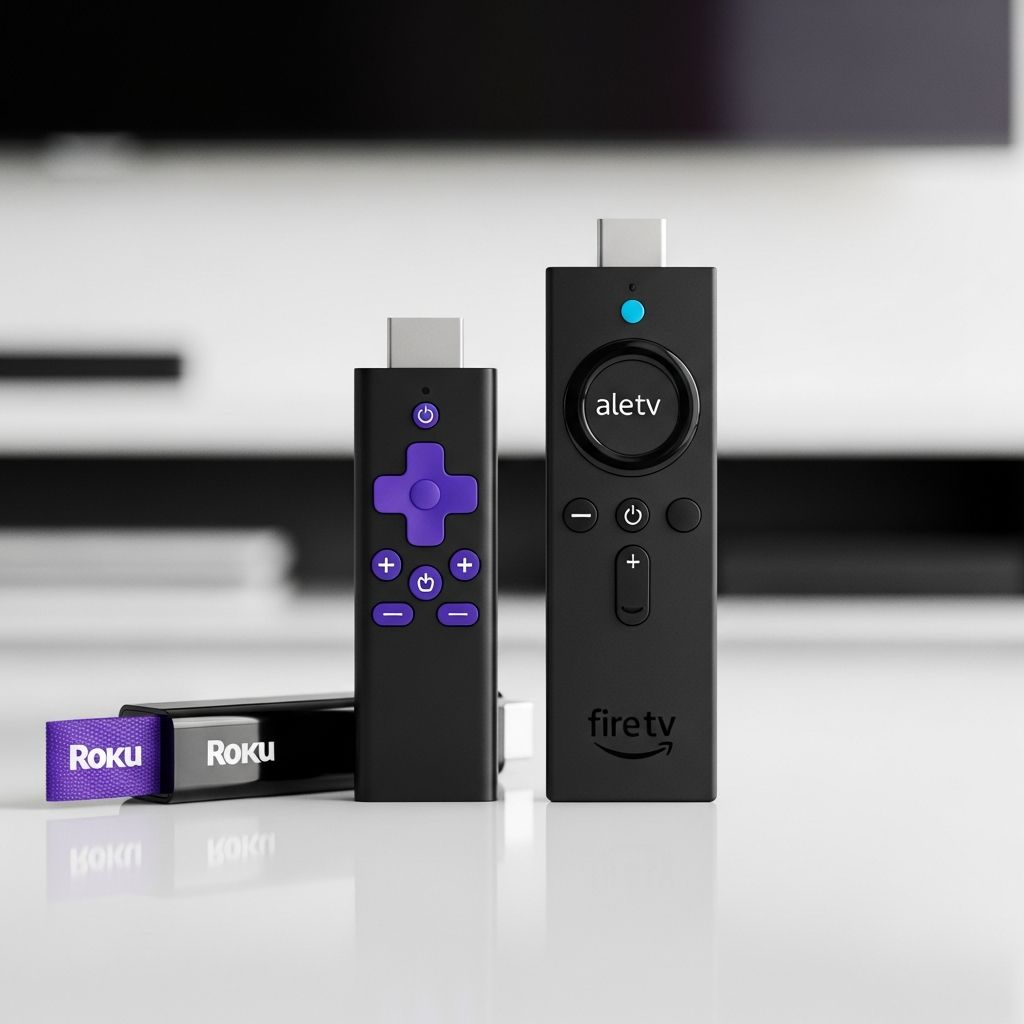
Streaming devices like Roku and Amazon Firestick have revolutionized how we watch TV, letting cord-cutters ditch expensive cable bills for affordable on-demand entertainment. But with so many models and features, which one is the better value? This comprehensive comparison breaks down prices, channels, interfaces, remotes, performance, and more to help you decide between Roku and Firestick in 2026.
Both devices plug into your TV’s HDMI port and stream content from services like Netflix, Hulu, and Disney+. Roku emphasizes a neutral platform with thousands of channels, while Firestick integrates deeply with Amazon’s ecosystem. We’ll cover everything from entry-level sticks to premium 4K models, focusing on real-world savings for budget-conscious viewers.
What Is Roku?
Roku is a standalone streaming platform founded in 2002, offering devices that work with any major streaming service without favoring one brand. It’s known for its simple interface, vast channel store (over 5,000 apps), and free ad-supported content via The Roku Channel. Roku devices range from basic HD models to high-end 4K players with voice remotes and Ethernet ports.
Roku’s business model relies on revenue from channel partnerships and ads on its home screen, which keeps device prices low. Popular options include the Roku Express for beginners and the Roku Ultra for power users seeking Dolby Vision and expandable storage.
What Is Firestick?
Amazon Firestick (officially Fire TV Stick) runs on a customized Android OS and is designed to integrate seamlessly with Amazon Prime Video, Alexa smart home devices, and Echo speakers. Launched in 2014, it’s Amazon’s answer to Roku, with strong side-loading support for third-party apps and gaming via Luna.
Firestick prioritizes Amazon content on its interface but supports all major services. Models like the Fire TV Stick 4K Max offer Wi-Fi 6, 16GB storage, and Dolby Atmos, making it ideal for Prime members. However, it shows more ads and recommendations tailored to Amazon services.
Roku vs Firestick: Price Comparison
Price is a key factor for penny pinchers. Roku offers more budget options starting under $30, while Firestick’s lineup is slimmer but often goes on sale via Amazon deals.
| Device | Price | Resolution | Key Features |
|---|---|---|---|
| Roku Express | $29.99 | 1080p | Basic remote, Wi-Fi |
| Roku Express 4K+ | $39.99 | 4K HDR | Voice remote |
| Roku Streaming Stick 4K | $49.99 | 4K HDR | Voice remote, long-range Wi-Fi |
| Roku Ultra | $99.99 | 4K Dolby Vision | Ethernet, USB, Bluetooth |
| Fire TV Stick Lite | $29.99 | 1080p | Alexa remote |
| Fire TV Stick HD | $39.99 | 1080p | Improved Wi-Fi |
| Fire TV Stick 4K | $49.99 | 4K HDR10+ | Alexa, Dolby Vision |
| Fire TV Stick 4K Max | $59.99 | 4K Dolby Vision | Wi-Fi 6, 16GB storage |
Roku wins on variety, with more sub-$50 options. Firestick edges out during Prime Day sales, often dropping to $20. Long-term, both avoid monthly fees beyond subscriptions, but Roku’s free channels add extra savings.
Roku vs Firestick Channels and Content
Roku boasts the largest channel store with over 5,000 apps, including niche international and free ad-supported options like The Roku Channel (Tubi-style content). It supports Netflix, Hulu, Disney+, Prime Video, Peacock, and more without bias.
Firestick’s Amazon Appstore has fewer official channels (around 12,000 total apps, but streaming-focused) but excels in side-loading APKs for jailbroken apps, VPNs, and IPTV. Prime members get exclusive perks like faster downloads. Roku blocks sideloading, limiting advanced users.
- Roku Strengths: More free content, neutral recommendations.
- Firestick Strengths: Prime integration, third-party app freedom.
Roku vs Firestick Interface and Navigation
Roku’s clean, grid-based home screen prioritizes your favorite channels alphabetically or by usage. Search is universal across apps, with no heavy ads—though pause screens show promotions.
Firestick’s interface is carousel-style, pushing Amazon Prime content first, followed by recent watches and personalized recs. It’s faster on higher-end models but ad-heavy at startup and pauses. Roku feels more neutral and customizable for non-Prime users.
Roku vs Firestick Remote and Voice Control
Remotes are a standout feature battle.
| Feature | Roku (Ultra/Pro) | Firestick (4K Max) |
|---|---|---|
| Voice Assistant | Alexa/Google compatible | Built-in Alexa |
| TV Controls | Power/Volume | Power/Volume/IR |
| Private Listening | Headphones jack | Bluetooth |
| Find My Remote | Yes (Pro) | Yes (Alexa) |
| Rechargeable | Optional | No (AAA batteries) |
Firestick’s Alexa enables hands-free control via Echo devices, ideal for smart homes. Roku’s remotes offer more buttons and lost-remote finder but require hubs for full voice integration.
Roku vs Firestick Performance and Specs
Premium models compete closely in 4K streaming.
- Roku Ultra: Quad-core processor, 2GB RAM, Ethernet, Dolby Vision/Atmos, USB port.
- Firestick 4K Max: 1.98GHz quad-core, 2GB RAM, Wi-Fi 6, 16GB storage, Luna gaming.
Firestick pulls ahead in raw speed and multitasking due to Android optimizations, while Roku offers better wired connectivity. Both handle 4K HDR flawlessly on capable TVs.
Roku vs Firestick Mobile Apps
Both free apps (iOS/Android) turn your phone into a remote with keyboards, voice search, and casting. Roku supports headphone jack private listening; Firestick uses Bluetooth. Firestick adds screen mirroring for Prime content.
Roku vs Firestick: Ads and User Experience
Roku shows non-intrusive ads on screensavers and pauses. Firestick is more aggressive with video ads at startup and Prime pushes. Advanced users prefer Firestick for ad-free sideloading via Downloader app.
Best Roku Devices for Budget Shoppers
- Roku Express ($29.99): Perfect entry-level for 1080p TVs.
- Roku Streaming Stick 4K ($49.99): Value 4K pick with voice remote.
- Roku Ultra ($99.99): Top-tier for gamers and home theater enthusiasts.
Best Firestick Devices for Budget Shoppers
- Fire TV Stick Lite ($29.99): Cheap Alexa intro.
- Fire TV Stick 4K ($49.99): Balanced 4K performer.
- Fire TV Stick 4K Max ($59.99): Fastest with future-proof Wi-Fi 6.
Pros and Cons: Roku
- Pros: More channels/free content, simple interface, device variety, Google/Alexa support.
- Cons: Ads on platform, no sideloading, weaker hardware in budget models.
Pros and Cons: Firestick
- Pros: Alexa integration, sideloading/VPNs, better performance, Prime perks.
- Cons: Amazon bias/ads, fewer official channels, ecosystem lock-in.
Roku vs Firestick: Which Should You Buy?
Choose Roku if you want a neutral, channel-rich experience with free content and don’t mind ads—ideal for non-Prime households. Pick Firestick for Amazon loyalists, smart home users, or those needing customization. Both save hundreds yearly over cable, but Firestick 4K Max offers the best speed-to-price ratio in 2026.
Frequently Asked Questions (FAQs)
Is Roku better than Firestick?
Roku excels in channel variety and neutrality, while Firestick wins for performance and Amazon integration. It depends on your subscriptions.
Can you put Netflix on both?
Yes, both support Netflix, Hulu, Disney+, and all major apps natively.
Which has more free channels?
Roku, with The Roku Channel and 5,000+ options including ad-supported freebies.
Does Firestick work without Prime?
Absolutely—it’s fully functional without Amazon Prime, though optimized for it.
Are Roku devices easier to set up?
Both are plug-and-play, but Roku’s simpler interface suits beginners better.
Which supports 4K best?
Firestick 4K Max for speed; Roku Ultra for connectivity. Both handle Dolby Vision.
References
- Roku vs Firestick in 2026: Which is Better for Streaming? — Cloudwards. 2026. https://www.cloudwards.net/roku-vs-firestick/
- Roku vs Firestick: Which Streaming Device Wins in 2026? — TroyPoint. 2026. https://troypoint.com/roku-vs-firestick/
- The Best Streaming Devices of 2026 — Business Insider. 2026. https://www.businessinsider.com/guides/tech/best-streaming-devices
Similar Articles








Read full bio of medha deb