Parts of a Credit Card: Complete Anatomy Guide
Master every component of your credit card and understand how each part protects your finances.
Understanding the Complete Anatomy of Your Credit Card
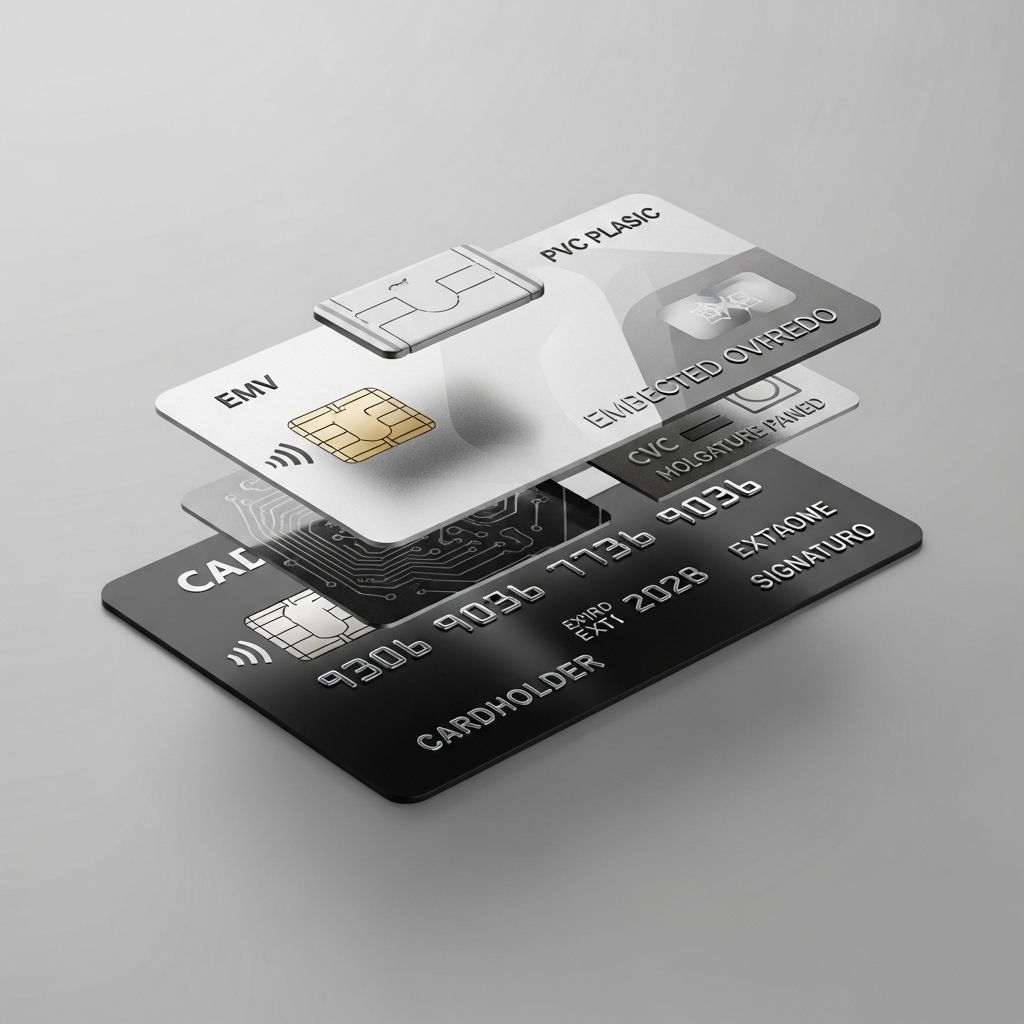
Your credit card is more than just a rectangular piece of plastic. It contains multiple sophisticated components working together to enable secure transactions, protect your financial information, and provide convenient payment options. Understanding the different parts of your credit card helps you use it more effectively, recognize security features, and identify potential fraud. Whether you’re making an online purchase, swiping at a retail store, or tapping for a contactless payment, each component serves a critical purpose in the transaction process.
Most people rarely think about the intricate details embedded in their credit cards. They simply tap, swipe, or enter their card information online and move forward with their purchase. However, knowing the specific parts of your credit card and their functions is essential for maximizing security, troubleshooting issues, and understanding how your card protects your financial data. This comprehensive guide breaks down every element of your credit card so you can better understand how it works and keep your information secure from fraud.
Front-Side Components of Your Credit Card
Card Issuer Logo
One of the first things you’ll notice on the front of your credit card is the logo of the bank that issued it, typically located in the upper left corner. This logo represents the financial institution that provides your credit line, handles your payments, manages your transactions, and administers your rewards program. The card issuer is responsible for setting your credit limit, determining your interest rates, and managing your account.
You’ll also see a separate logo representing the credit card network that processes your transactions, such as Visa, Mastercard, American Express, or Discover. This network logo determines where your card will be accepted globally. The presence of a Mastercard logo, for example, means your card is accepted at millions of merchants worldwide that recognize the Mastercard payment network.
Credit Card Number (Primary Account Number)
Your credit card number, also known as the Primary Account Number (PAN), is the 16-digit number prominently displayed on the front of your card. This number is divided into three distinct components that serve different purposes in transaction processing:
Bank Identification Number (BIN): The first six to eight digits of your card number comprise the BIN, also called the Issuer Identification Number (IIN). The BIN identifies which bank or financial institution issued your card and routes payment details to the correct processing network and bank. This number tells the payment system where to send your transaction information for authorization and clearing.
Account Identifier: The middle section of your card number, typically comprising six to nine digits, serves as your unique account identifier. Your issuing bank uses this specific sequence of numbers to identify your individual credit account within their system. This ensures that your transactions are properly credited or debited to your specific account.
Check Digit: The final digit of your card number is the check digit, which validates the authenticity of the entire credit card number using the Luhn algorithm. This mathematical verification system ensures that the card number is legitimate and hasn’t been altered or incorrectly entered.
Cardholder Name
Your name appears on the front of your credit card, typically in the lower left area. The cardholder name indicates the only person authorized to use the card for any transaction. This name serves as a critical security feature—many retailers require cardholders to show a valid identification document matching the name on the card before accepting payment. The name on your card should match exactly how you enter your billing information when making online purchases, as discrepancies can cause transaction failures or fraud alerts.
EMV Chip
The EMV (Europay, Mastercard, and Visa) chip is a small, metallic square typically located on the front of your card, usually positioned in the center-left area. This microprocessor-based integrated circuit represents a major advancement in credit card security. Unlike the magnetic stripe, which stores static cardholder data that remains constant throughout the card’s lifetime, the EMV chip generates a unique, one-time code for every single transaction you make.
This dynamic code generation makes it virtually impossible for fraudsters to clone or duplicate your card. Even if a criminal manages to steal your card information, they cannot replicate the EMV chip itself, which means they cannot use the stolen data to create counterfeit cards or make unauthorized purchases. When you insert your card into a chip reader at a point-of-sale terminal, the chip communicates with the terminal to create this unique transaction code, dramatically improving security compared to the older magnetic stripe technology.
Contactless Payment Indicator
Many modern credit cards feature a contactless payment indicator, which appears as a sideways Wi-Fi symbol or four curved lines that increase in size from left to right. This symbol indicates that your card supports tap-to-pay technology, allowing you to make purchases by simply tapping your card on a contactless-enabled point-of-sale terminal without inserting it or swiping it.
Contactless payments add convenience to your purchasing experience while maintaining strong security through the same EMV technology. The indicator is typically located on the front or back of your card, and when you use this feature, your card still generates unique transaction codes that protect your information from fraud. This technology has become increasingly popular, especially for small transactions where speed and ease of payment are priorities.
Back-Side Components of Your Credit Card
Magnetic Stripe
The magnetic stripe, commonly called the magstripe, is the dark band typically located at the top of the back side of your credit card. This component contains stored information about your card and cardholder details, including your name, card number, expiration date, and other data necessary to process transactions. When you swipe your card at a traditional point-of-sale terminal, the reader accesses the information stored in this magnetic stripe.
However, magnetic stripes have significant security limitations. The information they contain is static and unchanging throughout the card’s entire lifetime, making it vulnerable to criminals who use skimming devices to capture card data. These skimmers can be attached to ATMs, gas pumps, or card readers to illegally extract information from the magnetic stripe without the cardholder’s knowledge. This vulnerability is why magnetic stripe technology is gradually being replaced by the more secure EMV chip technology.
Card Expiration Date
Located on the back of your card, the expiration date indicates when your current card will no longer be valid for transactions. This date is typically displayed in a month/year format (for example, 12/26). Credit cards generally have validity periods ranging from three to five years. When your card approaches its expiration date, your card issuer will typically send you a replacement card automatically, although you may request an earlier replacement if needed.
The expiration date serves multiple purposes beyond simply marking when your card becomes invalid. It provides card issuers with an opportunity to issue updated cards with the latest security features and technology. Additionally, the expiration date helps merchants and payment processors verify that a card is current and active, providing an additional layer of fraud prevention in online transactions.
Signature Panel
The signature panel is located on the lower back area of your credit card and provides a designated space for your handwritten signature. Traditionally, this signature serves as a security feature and authorization method—merchants would compare the signature on the back of your card to the signature on your receipt to verify that the person using the card was the authorized cardholder.
However, the importance of the signature panel has diminished over time with the advancement of more sophisticated security technologies like the EMV chip and contactless payments. Many retailers no longer consistently check signatures, and some have eliminated signature requirements altogether for small transactions. If your card already includes an EMV chip and contactless payment capability, the signature panel functions more as a legacy security feature that serves as a helpful backup rather than a critical component of your card’s security infrastructure.
CVV Security Code
The CVV (Card Verification Value) code, also known as the CVC (Card Verification Code) or CID (Card Identification) code, is a three or four-digit security code located on the back of your credit card. For most cards, this code appears in the signature panel area, typically to the right of the magnetic stripe. American Express cards place their four-digit CVV code on the front of the card above the card number.
The CVV serves as a crucial security feature for online and phone transactions where the physical card is not present. Merchants and payment processors use this code to verify that you actually possess the physical card and are not simply using a stolen card number. This verification process adds significant protection against unauthorized online purchases. Importantly, the CVV should never be stored or shared unnecessarily, and legitimate businesses will never ask for your CVV via email or phone calls, as doing so would be a major security red flag.
Hologram Security Feature
Most modern credit cards include a hologram sticker, typically located on the lower back area of the card. This three-dimensional image changes appearance when viewed from different angles and is specifically designed to make counterfeiting your card extremely difficult. Holograms are created using multiple layers of images aligned at different angles and depths, creating a visual effect that cannot be easily replicated or reproduced through standard printing or photocopying techniques.
This anti-counterfeiting feature helps retail merchants quickly identify legitimate credit cards and reject fraudulent replicas. The hologram’s three-dimensional nature and complex construction make it one of the most effective physical security features on a credit card, requiring sophisticated technology to produce counterfeit versions. When examining your card, you can use the hologram as a quick visual check to ensure your card hasn’t been replaced with a counterfeit version.
Understanding Card Numbers in Detail
Your credit card number is not a random sequence of digits but rather a carefully structured code that contains important information about your account. Different card issuers and networks use variations in formatting and number sequences, but all credit cards follow the same basic principles for organizing account information.
The 16-digit format (which is standard for most Visa and Mastercard cards) breaks down systematically. The first digit typically indicates the major industry identifier, with four representing Visa and five representing Mastercard. The next five to seven digits comprise the bank identification number. The middle section identifies your specific account, and the final digit is the check digit that validates the entire number using the Luhn algorithm.
Understanding this structure helps you recognize potential fraud if you notice unusual card numbers or helps you troubleshoot issues when entering your card information online. It also helps you understand why card readers reject incorrectly entered numbers—the Luhn algorithm ensures that only mathematically valid card numbers are accepted by payment systems.
Security Features and Fraud Protection
Modern credit cards incorporate multiple overlapping security features designed to protect your financial information and prevent fraudulent transactions. These features work together to create a comprehensive security system that addresses different types of threats and attack vectors.
Chip Technology: The EMV chip generates unique transaction codes that cannot be reused, making cloned cards completely useless for fraudsters. This technology has reduced counterfeit fraud by up to 85% in markets where it has been widely adopted.
Hologram and Physical Features: The hologram and other physical design elements make counterfeiting difficult and help merchants visually verify card authenticity at the point of sale.
CVV Verification: The three or four-digit CVV code provides an additional layer of security for remote transactions where the card is not physically present.
Name Verification: The cardholder name on the front of the card serves as a basic identity verification tool, with many merchants requiring ID checks for validation.
Debit Card Components: Similarities and Differences
Debit cards share most of the same physical components and security features as credit cards, including EMV chips, CVV codes, magnetic stripes, and holograms. This similarity exists because debit cards and credit cards are both accepted at the same merchants and use the same payment networks.
The primary difference between debit and credit cards lies not in their physical structure but in their funding source. When you use a debit card, the funds come directly from your savings or checking account. When you use a credit card, you are borrowing money from your issuing bank’s credit line and will receive a bill for the amount later. Despite this functional difference, both card types need to include the same security features and components to ensure safe, verified transactions.
How to Protect Your Card Information
Understanding the parts of your credit card is the first step toward protecting your financial information. Beyond knowing what each component does, you should take practical steps to safeguard your card:
– Store your card in a secure wallet or cardholder that protects it from physical damage and unauthorized access
– Keep your card away from extreme heat, magnets, or anything that might damage the magnetic stripe or chip
– Never share your CVV code, expiration date, or full card number through unsecured communication channels
– Monitor your card statements regularly for unauthorized transactions
– Report lost or stolen cards to your issuer immediately
– Use your card’s security features—especially the chip reader and contactless payment—rather than swiping when available
– Be cautious of skimming devices at ATMs and gas pumps
Frequently Asked Questions
Q: What is the difference between the CVV and the card number?
A: Your card number (PAN) is your account identifier used for all transactions, while the CVV is a three or four-digit security code used specifically for remote transactions to verify you physically possess the card. The CVV should never be stored or transmitted unnecessarily.
Q: Why do credit cards have both a chip and a magnetic stripe?
A: Credit cards are hybrids that support both technologies for maximum compatibility and convenience. The chip provides superior security, while the magnetic stripe ensures compatibility with older terminals and readers that haven’t yet been upgraded to chip technology.
Q: Can someone use my credit card if they only have the card number?
A: Having just the card number is not sufficient for most in-person transactions because merchants require the physical card to generate the chip code. For online transactions, merchants also require the CVV and expiration date. However, you should still treat your card number as sensitive information and protect it from unauthorized access.
Q: What does the contactless symbol mean?
A: The contactless symbol indicates that your card supports tap-to-pay technology. You can make purchases by holding the card near a contactless-enabled terminal without swiping or inserting the card. This technology is secure because it uses the same EMV chip technology that generates unique transaction codes.
Q: How often should I replace my credit card?
A: Your card issuer will automatically send you a replacement before your current card expires. You may also request an early replacement if your card is damaged, lost, or stolen. Most issuers replace cards every three to five years.
Q: Is it safe to write my CVV on the back of my card?
A: No, you should never write your CVV on your card or store it anywhere accessible. Your CVV should only be shared directly with merchants during transactions and never saved, emailed, or transmitted through unsecured channels.
Conclusion
Every component of your credit card serves a specific purpose in enabling secure, convenient transactions while protecting your financial information. From the EMV chip that generates unique codes for each transaction to the CVV code that verifies your possession of the physical card, modern credit cards incorporate multiple security layers designed to prevent fraud and unauthorized use.
By understanding what each part of your credit card does and how these components work together, you can use your card more effectively and make informed decisions about how to protect your financial information. Whether you’re choosing to use chip technology, contactless payment, or traditional magnetic stripe transactions, knowing your card’s capabilities and security features helps you make secure purchases with confidence. Taking the time to understand your credit card transforms it from a mysterious piece of plastic into a comprehensible financial tool that you can use safely and effectively.
References
- Anatomy of Plastic Money: 13 Credit Card Parts You Should Know — MoneyMax. Accessed November 29, 2025. https://www.moneymax.ph/credit-card/articles/credit-card-parts
- Parts of a Credit Card: CVV, EMV Chip and More — Citizens Bank. Accessed November 29, 2025. https://www.citizensbank.com/learning/credit-card-innovation-design.aspx
- Credit Card Data Formats and the Luhn Algorithm — Ground Labs. Accessed November 29, 2025. https://www.groundlabs.com/blog/anatomy-of-a-credit-card
- Credit Card Anatomy: Explaining the PAN, BIN, CVV, & Others — Basis Theory. Accessed November 29, 2025. https://blog.basistheory.com/credit-card-anatomy
- How Credit Cards Work: Knowing Different Parts of a Credit Card — MoneyFitt. Accessed November 29, 2025. https://www.moneyfitt.co/articles/how-credit-cards-work-knowing-different-parts-of-a-credit-card
Similar Articles








Read full bio of Sneha Tete