How To Save Money On Printer Ink: 10 Proven Ways
Printer ink costs add up fast. Discover proven strategies to slash expenses without sacrificing print quality or convenience.
Printer ink is one of the most notorious hidden costs in modern life. A single cartridge can cost as much as $50 or more, and they often run out after just a few hundred pages. But with the right strategies, you can dramatically reduce your printing expenses without compromising quality. This guide covers all the top methods, from choosing the right printer to clever hacks and subscription services.
1. Buy a Printer with Cheap Ink from the Start
The cheapest printer upfront often becomes the most expensive over time due to ink costs. Before purchasing, research ink prices and page yields. For example, a $39 printer might require $75 replacement cartridges that only last 200 pages.
Opt for reservoir (tank) printers: These use affordable ink bottles instead of cartridges. Canon and Epson models come with enough ink for about two years of moderate printing. Replacement bottles cost $10–$20 each, making them far cheaper long-term.
- Canon Pixma G4210: Around $300 upfront, but sub-$20 bottles yield massive savings after two years compared to cartridge-based models under $100.
- Benefits: No frequent replacements; high page yields (up to 6,000 black pages per bottle).
- Drawback: Higher initial cost, but pays off quickly for regular users.
Laser printers are another smart choice for high-volume text printing. Toner lasts longer than ink, and printers start at $75. They’re ideal if you print coupons or documents frequently.
2. Use Draft or Economy Mode
Most printers have a draft, economy, Toner Save, or EconoMode setting that uses 30–60% less ink. Access it via print preferences or dialog box. Print quality is sufficient for drafts, emails, or tickets—Century Gothic font alone saves 30% over Arial.
Consumer Reports tests show draft mode speeds up printing while conserving resources. Always test a sample page first.
3. Subscribe to an Ink Delivery Service
Services like HP Instant Ink charge based on pages printed, not ink volume—perfect if you print sporadically. Plans start free (15 pages/month) up to $20 for 700 pages. Overages cost $1 per 10–20 pages. HP claims 50% savings; printers auto-order via WiFi.
- Bonus: Covers maintenance ink usage, which can waste cartridges.
- Alternatives: Canon CAREPAK, Epson ReadyPrint, Best Buy/Amazon Dash subscriptions monitor levels automatically.
- Tip: Track your monthly pages to avoid oversubscribing.
Many HP models include a 3-month trial. Sign up via HP, Best Buy, or Staples.
4. Shop for Third-Party or Remanufactured Ink
Aftermarket cartridges are recycled, refilled, and sold at 50–70% less. An HP 27 black cartridge is $31 from HP but $11 from LD Products.
- Remanufactured: Half the price of OEM; reliable for years per user reports.
- eBay deals: Five-packs for $9–$14 vs. $70 retail.
- Caution: Some leak or underperform; stick to reputable sellers.
Buy online from sites offering sales and free shipping for maximum savings—up to 45% off.
5. Stock Up on Ink When It’s on Sale
Ink stores for up to three years. Keep extras on hand and buy in bulk during deals (e.g., 3–4 cartridges). This avoids premium ’emergency’ prices.
6. Refill Your Own Cartridges
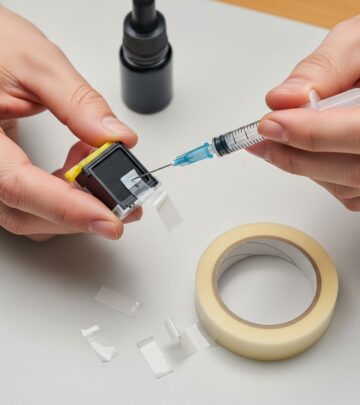
For refillable models, buy ink kits for pennies per page. Not for the faint-hearted, but viable for certain printers.
7. Trick Low-Ink Sensors (Toner Hack)
Many cartridges have optical sensors that trigger ‘low’ prematurely. Cover the clear windows on both sides with black marker-taped tape. This squeezes out extra pages from ’empty’ cartridges—works on Brother, HP models.
Warning: Use at own risk; may void warranty.
8. Prevent Ink from Drying Out
If you print infrequently, remove cartridges, reseal, and store in zip-lock bags. This keeps ink fresh vs. drying in the printer.
9. Leave Your Printer On
Turning inkjets off/on triggers costly maintenance cycles that use as much ink as printing. Keep it on—power draw is minimal, savings significant.
10. Print Smart: Fewer Pages, Black and White
Preview docs to delete unnecessary pages. Print in grayscale to save color ink. Use high-yield XL cartridges when available—deals at Staples for pairs.
Cost Comparison Table
| Method | Upfront Cost | Cost per 1,000 Pages | Best For |
|---|---|---|---|
| Standard Cartridge Printer | $100 | $50–$100 | Very low volume |
| Reservoir (Tank) Printer | $200–$300 | $5–$10 | Regular users |
| HP Instant Ink (50 pages/mo) | Varies | $3/month fixed | Consistent low volume |
| Remanufactured Ink | Low | $10–$20 | Budget cartridge users |
| Laser Printer Toner | $75+ | $15–$30 | Text-heavy printing |
Estimates based on moderate use; actual varies by model.
Frequently Asked Questions (FAQs)
Are third-party inks safe for my printer?
Most are reliable from reputable sellers, but cheap ones may leak or clog heads. Consumer Reports recommends testing small quantities first.
Do tank printers work for color photos?
Yes, many like Epson EcoTank produce photo-quality output at low cost per page.
Is HP Instant Ink worth it if I overprint?
Only if you stay under limits; overages add up. Track usage via app.
How long does printer ink last unopened?
Up to 3 years if stored cool and dry.
Can I mix OEM and remanufactured cartridges?
Usually yes, but check your manual to avoid errors.
Implementing even a few of these tips can halve your ink bills. Start by auditing your printing habits and printer model for tailored savings.
References
- Ways to Save Money on Printer Ink — Consumer Reports. 2023-06-20. https://www.consumerreports.org/electronics-computers/printers/ways-to-save-money-on-printer-ink-a1045377994/
- How to Save on Printer Ink — The Happy Housewife. Accessed 2026. https://thehappyhousewife.com/frugal-living/how-to-save-on-printer-ink/
- How saving money on ink starts by choosing the right printer — Consumer Reports (YouTube via 6abc Philadelphia). 2023-06-20. https://www.youtube.com/watch?v=Kii3QW_hLt4
Similar Articles








Read full bio of Sneha Tete